
Building AI agents used to be the kind of thing only research labs did. In 2026, it’s something a solo developer can pull off over a weekend — if they know what they’re doing. This guide cuts through the noise and gives you a practical, no-fluff roadmap to designing, building, and deploying AI agents that actually work in production.
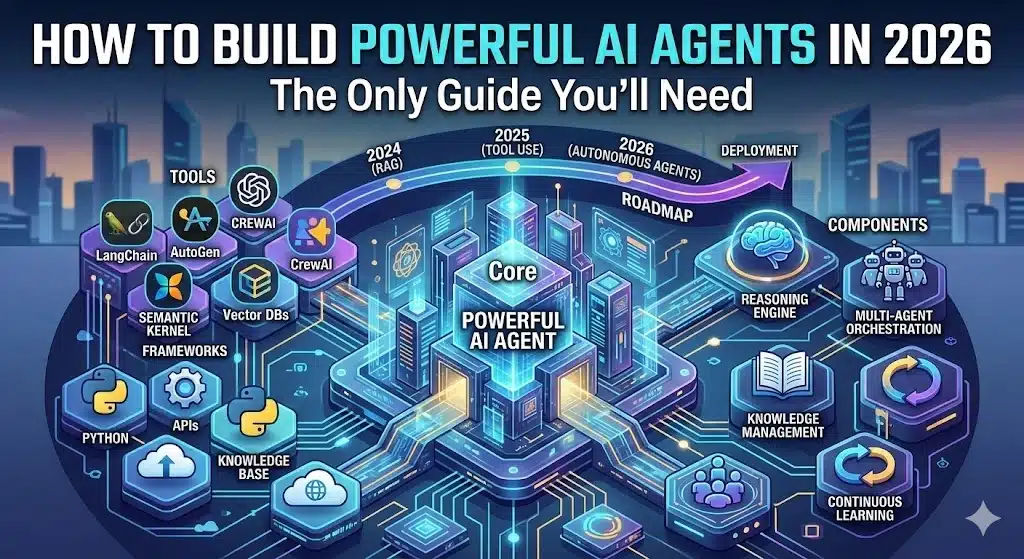
Whether you’re a developer exploring agentic systems for the first time or a product team looking to automate complex workflows, this is your end-to-end reference for understanding and building AI agents at every level.
Table of Contents
What Are AI Agents (And Why 2026 Is the Tipping Point)?
AI agents are autonomous software systems that perceive inputs, reason about them, and take actions — often without human intervention at every step. Unlike a standard chatbot that responds and stops, AI agents loop: they plan, act, observe results, and act again until a goal is reached.
The reason 2026 marks a genuine inflection point for AI agents is convergence. Better foundational models, mature orchestration frameworks, reliable tool-calling APIs, and growing developer tooling have all matured at the same time. Enterprises are now deploying AI agents for customer support, code generation, research summarization, data pipelines, and supply chain management — not as experiments, but as production systems.
If you’ve been waiting for the right time to build AI agents, that time is now.
Check Out : Best AI Tools to Predict Gold and Silver Prices in 2026: A Complete Guide
The Core Architecture Every AI Agent Needs
Before picking a framework or writing a single line of code, you need to understand what makes an AI agent tick. Every well-designed AI agent has five core components:
1. The Brain (LLM / Reasoning Core)
The large language model is the decision-making engine. Models like GPT-4o, Claude 3.5 Sonnet, Gemini 1.5 Pro, and Llama 3 serve as the reasoning backbone of most AI agents today. The LLM interprets instructions, reasons about context, and decides which action to take next.
2. Memory
AI agents need memory to function coherently over time. There are three types:
- In-context memory — what fits in the active prompt window
- External memory — vector databases like Pinecone, Weaviate, or Chroma
- Episodic memory — structured logs of past interactions stored and retrieved dynamically
3. Tools
Tools are what give AI agents their power. A tool is any callable function — a web search, a code interpreter, a database query, an API call, a file reader. Without tools, an AI agent is just a chatbot with extra steps. With the right tools, it becomes a system that can take real-world actions.
4. Planning & Reasoning Loop
The agent loop is the heartbeat of AI agents. Most modern frameworks use a ReAct (Reason + Act) pattern: the agent reasons about what to do, calls a tool, observes the result, then reasons again. Some advanced AI agents use Tree-of-Thought or Plan-and-Execute patterns for more complex multi-step workflows.
5. Orchestration Layer
This is the glue — the code that coordinates the LLM, memory, tools, and loop logic. Frameworks like LangChain, LlamaIndex, CrewAI, and AutoGen handle this so you don’t have to build it from scratch.
Top Frameworks for Building AI Agents in 2026
Choosing the right framework is one of the most consequential decisions when building AI agents. Here’s what the landscape looks like in 2026:
LangChain
LangChain remains the most widely adopted framework for building AI agents. It offers deep integrations, a massive ecosystem, and strong documentation. LangGraph — its graph-based extension — is now the preferred way to build stateful, multi-step AI agents with looping and branching logic.
Best for: Developers who want maximum flexibility and a huge library of pre-built integrations.
LlamaIndex
LlamaIndex has evolved into a powerful framework for building AI agents that reason over private data. Its query engine and data connectors make it the go-to choice when your agent needs to ground its answers in a specific knowledge base.
Best for: RAG-heavy AI agents, document intelligence, enterprise knowledge systems.
CrewAI
CrewAI takes a multi-agent approach, letting you define “crews” of specialized AI agents that collaborate on tasks. An agent in CrewAI has a role, a goal, and a backstory — which surprisingly helps the LLM stay focused on its designated responsibilities.
Best for: Multi-agent workflows where different agents handle different specializations.
AutoGen (Microsoft)
AutoGen by Microsoft Research is designed for building conversational AI agents that can work together in group chats. It excels at code-generation workflows and multi-agent debate patterns.
Best for: Code generation, technical problem-solving, research workflows.
Anthropic’s Agent SDK / Tool Use API
Anthropic’s tool use API gives you a clean, native way to build AI agents on top of Claude. Combined with the computer use capability, it’s becoming a strong native alternative to third-party orchestration frameworks.
Best for: Teams already building on Claude who want low-latency, clean tool-calling.
Framework Comparison Table
| Framework | Best Use Case | Multi-Agent | Memory Support | Ease of Use | Open Source |
|---|---|---|---|---|---|
| LangChain / LangGraph | General-purpose AI agents | ✅ | ✅ (multiple) | Medium | ✅ |
| LlamaIndex | Data-intensive RAG agents | Partial | ✅ | Medium | ✅ |
| CrewAI | Role-based multi-agent crews | ✅ | ✅ | High | ✅ |
| AutoGen | Code generation & debate | ✅ | Partial | Medium | ✅ |
| Anthropic Tool API | Claude-native agents | ❌ native | Manual | High | ❌ |
| Semantic Kernel | Enterprise .NET / Python | ✅ | ✅ | Medium | ✅ |
Step-by-Step Roadmap: How to Build AI Agents From Scratch
Here’s the exact sequence experienced builders follow when building AI agents for production.
Step 1 — Define the Agent’s Scope (Don’t Skip This)
The biggest mistake people make when building AI agents is starting with the code. Start with the problem. Write down:
- What specific goal should this agent accomplish?
- What inputs will it receive?
- What actions can it take?
- What does “done” look like?
The clearer your goal definition, the better your AI agent will perform. Vague goals produce vague agents.
Step 2 — Choose Your LLM
For most AI agents, you’ll want a model with:
- Strong instruction-following
- Reliable tool/function calling
- Sufficient context window for your use case
In 2026, the practical shortlist for production AI agents includes GPT-4o (OpenAI API), Claude 3.5 Sonnet (Anthropic API), and Gemini 1.5 Pro (Google AI Studio). For cost-sensitive or local deployments, Llama 3 via Ollama is a serious option.
Step 3 — Define Your Tools
List every external capability your AI agent will need. Common tool categories:
- Search tools — web search, vector search, SQL queries
- Action tools — send email, create calendar event, write to file
- Compute tools — Python interpreter, calculator, data transform
- API tools — Slack, Notion, GitHub, Stripe integrations
Wrap each tool as a typed function with a clear description. The description is what the LLM reads to decide whether to use that tool — write it carefully.
Step 4 — Build the Agent Loop
Using your chosen framework, set up the core agent loop. In LangGraph, this is a state graph. In CrewAI, it’s a task execution pipeline. In vanilla Python with the OpenAI API, it’s a while-loop that checks if tool calls are returned and processes them.
Here’s the mental model for a basic AI agent loop:
User Input → LLM Reasoning → Tool Call (if needed) → Observe Result → LLM Reasoning → ... → Final AnswerKeep your first implementation simple. One agent, two or three tools, one clearly scoped task. Complexity is easy to add — simplicity is hard to recover.
Step 5 — Add Memory
For AI agents that handle multi-turn conversations or long tasks, memory becomes essential. Start with a simple conversation buffer. Graduate to semantic search over past interactions when you need the agent to recall specific details across sessions.
For external memory, Pinecone and Chroma are the most developer-friendly vector stores to integrate. Both have clean Python SDKs and good LangChain/LlamaIndex support.
Step 6 — Implement Guardrails
Production AI agents need guardrails. Without them, an agent that has access to real tools — databases, APIs, email — can cause real damage. Implement:
- Input validation — sanitize what goes into the agent
- Output filtering — check responses before they trigger actions
- Human-in-the-loop checkpoints — for high-stakes irreversible actions
- Rate limiting — prevent runaway loops from burning your API budget
Guardrails AI and NeMo Guardrails by NVIDIA are both worth evaluating for production AI agents.
Step 7 — Evaluate Before You Deploy
Testing AI agents is fundamentally different from testing traditional software because the same input can produce different outputs. You need:
- Trajectory evaluation — did the agent take the right steps?
- Tool call accuracy — did it call the right tools with the right parameters?
- End-to-end task success rate — how often does it complete the goal?
LangSmith offers tracing and evaluation tooling built specifically for AI agents built on LangChain. For model-agnostic evaluation, Braintrust and Arize Phoenix are excellent options.
Step 8 — Deploy and Monitor
Deploying AI agents to production means thinking about:
- Latency — agent loops are slow; stream outputs where possible
- Cost tracking — multi-step agents burn tokens fast; instrument every call
- Failure recovery — agents fail in weird ways; build retry and fallback logic
- Observability — log every tool call, every LLM call, every decision point
LangFuse is an open-source observability platform built for AI agents that works across frameworks and models.
Multi-Agent Systems: When One Agent Isn’t Enough
Single AI agents work well for focused, linear tasks. Complex workflows often need multiple AI agents working in coordination. Multi-agent systems let you:
- Parallelize work across specialized agents
- Use one “orchestrator” agent to delegate to “worker” agents
- Run quality-check agents that review outputs of other agents
- Build debate or consensus patterns where agents critique each other
CrewAI and AutoGen are purpose-built for this. LangGraph also handles multi-agent graphs elegantly. When building multi-agent systems, define clear handoff contracts between AI agents — what data format is one agent passing to the next, and what is that agent expected to do with it.
Also Read : JD Vance Net Worth 2026: Vice President’s Wealth, Luxury Properties & Complete Financial Breakdown
Common Mistakes When Building AI Agents (And How to Avoid Them)
Even experienced developers hit the same walls when building AI agents. Here are the ones that cost the most time:
Giving the agent too many tools — More tools don’t make better AI agents. They make confused agents. Start with 3-5 well-defined tools and only add more when you have evidence they’re needed.
Writing lazy tool descriptions — The LLM decides which tool to call based on your description. “Search the internet” is a terrible tool description. “Search the web and return the top 5 results for a given query, including URL and summary” is a great one.
Skipping evals — It’s tempting to just vibe-test your AI agent manually. But without structured evaluation, you won’t know when a model update breaks your agent or when a prompt change actually improved it.
Ignoring costs — A multi-step AI agent that calls a high-context model five times per user request can get expensive fast. Track token usage from day one.
The Future of AI Agents: What’s Coming
AI agents are moving fast. The trends shaping the next 12-24 months include:
- Agent-to-agent communication standards — protocols for AI agents to call and collaborate with other agents across different systems and providers
- Long-horizon agents — agents that can run tasks over hours or days, not just minutes
- Embodied agents — AI agents connected to robotic systems, physical interfaces, and IoT devices
- Agent marketplaces — pre-built, deployable AI agents for specific business functions, available as SaaS
The companies and developers who understand how to build, evaluate, and govern AI agents today are building a durable skill advantage that will compound for years.
Frequently Asked Questions About Building AI Agents
1. What programming language is best for building AI agents?
Python is the dominant language for building AI agents in 2026 due to the richness of its ML and AI ecosystem. TypeScript/JavaScript is a strong second choice, especially for developers building AI agents within web applications. Most major frameworks including LangChain, LlamaIndex, and CrewAI have both Python and JavaScript/TypeScript SDKs.
2. Do I need to fine-tune an LLM to build AI agents?
No. The vast majority of production AI agents use off-the-shelf foundation models via API. Fine-tuning is occasionally useful for very domain-specific vocabulary or formatting requirements, but it adds cost and complexity that most teams don’t need. Start with prompt engineering before even considering fine-tuning.
3. How much does it cost to run AI agents in production?
Costs vary widely depending on your model choice, the number of steps per task, and your request volume. A simple AI agent handling 1,000 tasks per day on GPT-4o might cost $50–$200/day. Using smaller models like GPT-4o-mini or local models via Ollama can reduce this by 10–100x. Instrument your costs from the start.
4. What’s the difference between an AI agent and a RAG pipeline?
A RAG (Retrieval Augmented Generation) pipeline retrieves relevant documents and feeds them into a single LLM call. An AI agent is more dynamic — it can decide when to retrieve, what to search for, how to act on what it finds, and loop back when the result isn’t good enough. RAG is often one tool inside a larger AI agent.
5. How do I prevent AI agents from going rogue or making mistakes?
Use guardrails, input/output validation, human-in-the-loop checkpoints for irreversible actions, rate limiting, and comprehensive logging. AI agents should always have a maximum step limit to prevent infinite loops. Tools with destructive potential (delete, send, publish) should require explicit confirmation before executing.
6. Can AI agents work without an internet connection?
Yes. You can build fully offline AI agents using local models (via Ollama or LM Studio) and local vector databases like Chroma or Qdrant. This is particularly useful for enterprise deployments with strict data privacy requirements.
7. What’s the best framework for a complete beginner?
CrewAI has the most beginner-friendly API for building AI agents — its role/goal/task abstractions map well to how non-engineers think about work. For developers comfortable with Python who want maximum control, LangGraph is the most powerful long-term choice.
8. How do AI agents handle errors and failures?
Well-designed AI agents use try/except blocks around tool calls, retry logic with exponential backoff for API failures, fallback tools (e.g., try Google search, fall back to DuckDuckGo), and structured error messages that the LLM can interpret and recover from. Building resilient AI agents is an engineering discipline in itself.
9. Should I build AI agents with one LLM or multiple?
Most AI agents work well with a single LLM. In multi-agent systems, you might use a powerful, expensive model (like GPT-4o or Claude 3.5) for planning and decision-making, and a faster, cheaper model (like GPT-4o-mini) for simpler sub-tasks. This “router” pattern is common in cost-optimized production AI agents.
10. How do I evaluate whether my AI agent is actually performing well?
Define task success criteria before you build. Then create a test suite of 20–50 representative tasks and score your AI agent on task completion rate, step efficiency (did it use the minimum steps needed?), and output quality. Use tools like LangSmith or Braintrust to automate evaluation runs and track performance over time.
Building AI agents is one of the highest-leverage technical skills you can develop right now. The developers who understand not just how to prompt a model, but how to architect, evaluate, and deploy reliable AI agents, are going to have an outsized impact on every industry in the years ahead. Start small. Ship something. Then iterate.
1 thought on “How to Build POWERFUL AI Agents in 2026: The Only Guide You’ll Need (Tools, Frameworks & Roadmap)”